
Please note the following process will only for LabelDirect Pro V6
Transferring your LabelDirect Pro V6 licence from one PC to another is a two-step process.
The computer you are moving the licence from is Computer A
The computer you are moving the licence to is Computer B
On Computer A, open LabelDirect and from the main menu select, ‘Licence’ then ‘Licence Transfer’
You will see the following dialog box:
The computer you are moving the licence from is Computer A
The computer you are moving the licence to is Computer B
On Computer A, open LabelDirect and from the main menu select, ‘Licence’ then ‘Licence Transfer’
You will see the following dialog box:
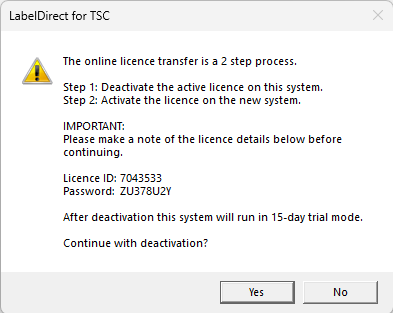
Make sure to make a note of the Licence ID and Password as you will need these to license Computer B.
Click on ‘Continue with Deactivation’ and LabelDirect for ZPL will be deactivated on Computer A and
will revert to trial for 15 days.
will revert to trial for 15 days.
On Computer B, download and install(if you haven’t already done so) the trial of LabelDirect Pro TSC from labeldirect.com
Open LabelDirect on Computer B and when prompted enter licence details taken from Computer A.
Open LabelDirect on Computer B and when prompted enter licence details taken from Computer A.